
How to Log In to Your Reddit Account and Make It Yours
October 16, 2026
BuyRedditAccounts Help· Customer support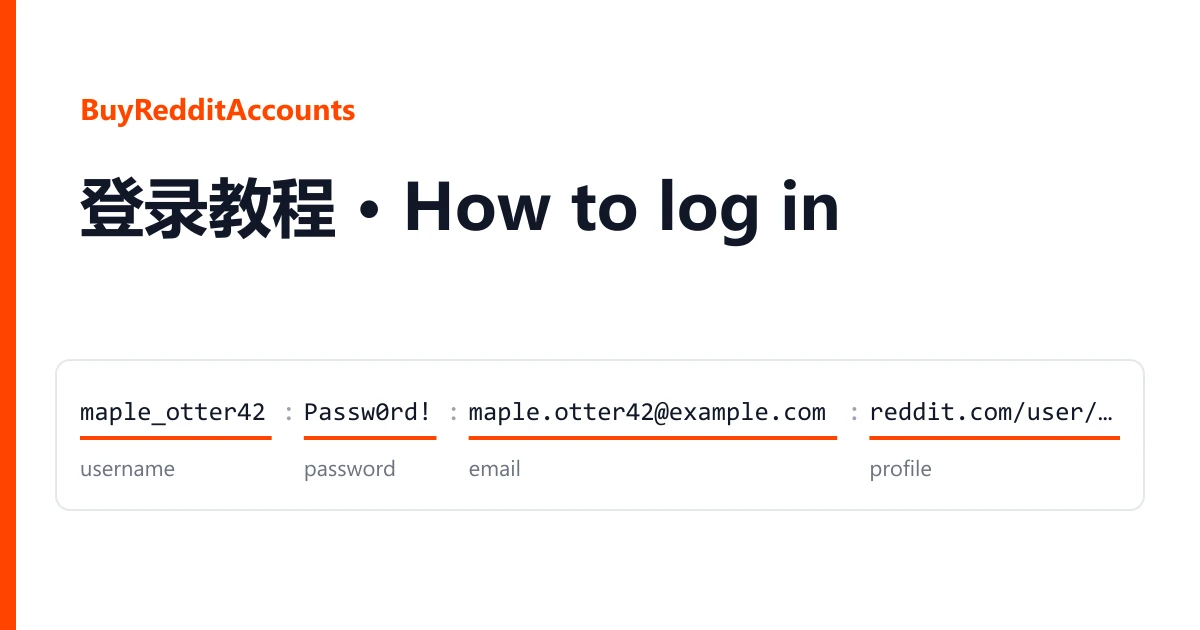
Each Reddit account you bought is one line of text on your order page. Open the order from your dashboard and the delivered lines are listed there, one account per line, with buttons to copy them or download them as a text file. Keep that file somewhere private: anyone holding a line can sign in to the account.
This guide goes in the order you will need it: read the line, check the profile, sign in, then make the email, the password and two-factor yours.
One line, four fields
Most deliveries look like this (the values are made up):
maple_otter42;Passw0rd!;maple.otter42@example.com;https://www.reddit.com/user/maple_otter42/Some batches separate the fields with a vertical bar instead of a semicolon. The order is the same:
quietheron2087|Passw0rd!2087|quietheron@example.com|https://www.reddit.com/user/quietheron2087/| Position | What it is | How to recognise it |
|---|---|---|
| 1 | Username | Letters, often with digits or an underscore at the end. It is also the last part of the profile link. |
| 2 | Reddit password | Usually mixed case with digits. Copy it exactly; it is case-sensitive. |
| 3 | Email address | Contains @. This is the address the account was registered or verified with. |
| 4 | Profile link | Starts with https://www.reddit.com/user/ and ends with the username. |
A few deliveries are shorter, just username:password. Listings that include a 2FA key or cookies add those after the fields above: a 2FA key is a run of capital letters and digits with no spaces, and cookies are a long block of text, often starting with [ or {. When the listing says the mailbox is included and you cannot tell which part is the mailbox password, ask in a ticket before you guess.
Open the profile link first
Before you sign in, paste the fourth field into a browser. You do not need to be logged in to see it. The page tells you three things in a few seconds:
- the account exists and the username matches the first field;
- the karma figure and the account age (Reddit shows the date it was created), which you can compare with the listing title;
- whether Reddit already shows the account as suspended.
If the page says the account is suspended or cannot be found, stop there and report it from your order page. Nothing you do after signing in will change that, and the screenshot of that page is all we need.
Signing in
- Go to reddit.com and choose Log In, or open the Reddit app and choose to log in.
- Type the username from the first field. Reddit also accepts the email, but the username is the more reliable choice for a delivered account.
- Paste the password from the second field. Check that no semicolon, bar or space came along with it.
- If Reddit asks for a verification code and your listing came with a 2FA key, paste the key into https://checkkit.net/en/online-2fa-code-generator and type the six digits it shows. The code changes every 30 seconds, so use it straight away.
On listings with cookies you can skip the password for now: install the Cookie-Editor browser extension, open reddit.com, import the cookie text with it and reload the page. You will still want the password for the steps below, and cookies stop working once the password changes.
Making the email yours
Listing titles describe the email in one of three ways, and each one needs a slightly different step. You will find the email setting in the account settings on reddit.com.
Email verified and included
You received the mailbox too, often Outlook, Hotmail or Rambler. Sign in to that mailbox first and look for Reddit's messages there, so you know it works. Then decide: keep it, after changing its own password and recovery details, or switch the Reddit account to an address you already own.
Email verified, not included
The address was confirmed with Reddit but the mailbox stays with the seller. Change the Reddit email to your own address soon after you sign in. Reddit asks for the account password and then sends a confirmation link to the new address; click it to finish.
Email not verified
No address is confirmed yet. Add your own and confirm it from the link Reddit sends. Until you do, the account has no way to recover a lost password.
Password and two-factor in your name
Once the email points to you, change the password to one only you know. Changing it signs out other sessions, including any cookie logins.
Then turn on two-factor authentication with your own authenticator app. If the account came with a 2FA key, the seller has seen that key: turn two-factor off and on again so Reddit issues a new one, scan it with your app, and keep the backup codes Reddit gives you in a password manager. After that the delivered key no longer works for anyone.
Reddit's user agreement does not allow accounts to be sold or transferred, and Reddit can ask any account to verify itself again. Use the account within Reddit's rules and the rules of each community; we do not give advice on getting around them.
If the sign-in does not work
"Incorrect username or password"
Copy the field again on its own, without the separator, and make sure you used the username rather than the profile link. Try once more, then stop: repeated failures can lock the account for a while.
Reddit asks for a code but your listing had no 2FA key
Reddit may send a code to the account's email. If the mailbox is included, read it there. If it is not, you cannot receive it, so report the line instead of retrying.
The account is suspended after you sign in
Take a screenshot of the notice before you click anything else.
Reporting it
Open a ticket from your order page within the warranty window shown on the listing. Include the username of the affected line, what you tried, and a screenshot of what Reddit showed. Signing in does not void the warranty; bans that follow bulk or automated activity are not covered. If you are not sure which listing fits your next order, the catalogue and the home page explain how the listings differ.